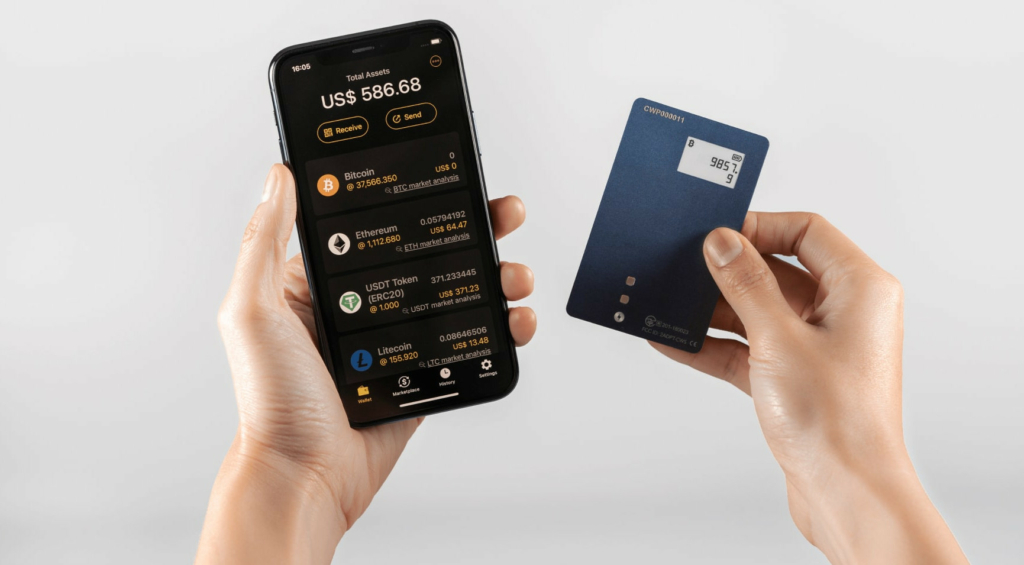
Step 1: Unbox like an auditor — the tamper check
Before anything touches your phone, examine what arrived. Supply-chain attacks on hardware wallets are rare but real, and the entire defense takes three minutes at the kitchen table.
First, provenance: this tutorial assumes you bought from the official coolwallet.io store or its official marketplace listings — never second-hand, never from a discount reseller. A tampered device can be pre-seeded, meaning the attacker already holds the recovery words and simply waits for you to deposit. If your card came from anywhere questionable, or arrived with a "scratch card" of pre-printed recovery words, stop here: legitimate CoolWallet devices never ship with a pre-generated seed. The discount code page explains why suspiciously cheap devices are the most expensive purchase you can make.
Second, the physical inspection. Per the official coolwallet.io site (July 2026), the box should contain: the Pro card itself, the charging set with its sleeve, a get-started guide, and two blank recovery cards. Check the outer packaging for re-shrink-wrapping, torn seals or restickered flaps. Examine the card body — it is a laminated, tamper-evident sandwich 0.8 mm thin, and any delamination, bubbling or edge damage means it goes back unopened, unused, unfunded. The card cannot be opened without visible destruction; that is your friend here.
Third, note what should not be in the box: nothing with words printed on recovery cards, no USB data cable (the Pro has no USB data mode — charging happens in the sleeve), and no leaflet directing you to download the app from anywhere except the official stores. Anything of that sort is a red flag worth a support email before proceeding.
Steps 2–3: Charge the card, install the genuine app
Slide the Pro into its charging sleeve and give it up to two hours for a full charge. The card runs a small rechargeable lithium-ion battery — 3 V, 15 mAh — and a full charge covers roughly two weeks of typical use at about two transactions a day, or up to three months on standby, per official figures. While it charges, set up the software side properly.
Install the CoolWallet app from the Apple App Store or Google Play only — developer name CoolBitX, version around 4.25.x as of July 2026, requiring iOS 15.6+ or Android 7.0+. The safest route is opening coolwallet.io in your browser and tapping its store badges, which sidesteps fake listings entirely. There is no desktop app, no browser extension and no official APK; if you have found one, you have found malware. The app download guide covers the verification checklist and the fake-app red flags in forensic detail — worth five minutes if this is your first wallet.
Do this setup at home, unhurried, on your own Wi-Fi or mobile data — not in a café, not on hotel Wi-Fi, not while half-watching something. Nothing about the process is technically fragile; the failure mode is a distracted human skipping the backup verification. Pour a coffee and give it the hour it deserves.
Step 4: Pair the card over Bluetooth
With the card charged and the genuine app installed, enable Bluetooth on your phone and open the app. Choose the option to connect a hardware wallet, and press the button on the card to wake it — the e-paper display comes alive. The app discovers the card and initiates pairing.
Here is the design detail worth appreciating: the pairing is confirmed on the card, physically. The app and card establish an end-to-end encrypted channel, and your button press on the hardware is what authorizes the bond. This pattern — the phone proposes, the card disposes — repeats through everything the Pro does, and it is the reason a compromised phone cannot quietly authorize anything on its own.
Pairing hygiene from the field: pair in a private space rather than a crowded venue, simply because calm beats bustle for any security ceremony. If the card does not appear, check the obvious first — card charged, Bluetooth actually on, no battery-saver mode strangling background radio — before assuming defects. And know that the pairing is per-phone authorization, not anything resembling an account: when you change phones next year, you just repeat this step, and your funds never notice. There is no CoolWallet login to migrate, as the login explainer makes clear — the card plus your seed backup are the whole identity.
Steps 5–6: Create the wallet and write down the seed — the sacred part
Now the moment the entire security model hangs on. The app will walk you through creating a new wallet, and the Pro generates a seed phrase — your choice of 12, 18 or 24 words — using hardware randomness inside the CC EAL6+ secure element. The private keys derived from these words will never leave that chip. The words themselves, however, are about to exist exactly once in the physical world, in your handwriting, and how you treat them decides everything downstream.
The rules, non-negotiable:
- Handwrite the words onto both recovery cards included in the box. Two copies, because paper is mortal. Print neatly; a smudged word 4 discovered during a disaster recovery is its own genre of tragedy.
- No photographs. No cloud notes. No password managers. No typing them anywhere. A seed that has touched an internet-connected device is no longer a cold backup — it is a hot liability with a paper souvenir.
- Store the two copies in two different places. Home safe plus bank deposit box, or home plus a trusted relative. Fire and burglary are single-address events; your backups should not be.
- Nobody else ever sees them. Not support, not family helping you set up, not this site. Anyone asking is the adversary — no exceptions have ever been recorded.
⚠ Then verify the backup — do not skip this. The app includes a verification step that quizzes your written words against the wallet. It feels like bureaucracy; it is the last moment a transcription error costs nothing. Fund a wallet with an unverified backup and you are trusting your own handwriting with everything, unchecked.
More seed philosophy — why these words outrank the hardware itself — lives in the cold wallet guide. For now: two verified copies, two locations, zero digital traces. Proceed.
Step 7: Receive a small test amount FIRST
Your wallet exists and its backup is verified. The temptation now is to move everything across in one triumphant transaction. Resist it. The habit that separates careful self-custody from expensive anecdotes is the test amount.
In the app, pick a coin — say BTC or ETH — and tap receive. The app displays an address; the Pro shows the matching address on its e-paper strip. Compare them. This on-card display is your independent channel: if malware on the phone ever swaps a receiving address, the card exposes the lie. Confirming the match takes ten seconds and builds the reflex that protects you for years.
Send a genuinely small amount from your exchange to that verified address — pocket-money scale, enough to feel real, cheap enough to shrug off. Wait for network confirmations and watch it appear in the app. Congratulations: you have proven the entire pipeline — exchange withdrawal, address integrity, network, app display — with nearly nothing at stake.
Only after the test lands do you move meaningful sums, and even then I suggest two tranches rather than one. Per the official coolwallet.io site (July 2026), the Pro supports 30+ blockchains and 12,000+ tokens — BTC, ETH, SOL, ADA, DOT, TRX, XRP, ATOM, DOGE, TON, USDT, USDC and the EVM family including Polygon, Arbitrum and Optimism — and the test-first ritual applies per chain. New network, new small test. Fees on test transactions are the cheapest insurance in finance.
Card ready? Sort out the on-ramp
A hardware wallet needs a trustworthy counterpart for buying and cashing out. Use a regulated exchange with a long security record, secure it with authenticator 2FA, and make withdrawal-to-card your default.
Open a secure exchange accountStep 8: Send with on-card confirmation — the full ritual
Receiving proves half the pipeline; sending proves the half where mistakes are irreversible. Do your first send small, and do it by the full ritual — this is the workflow you will repeat for as long as you self-custody.
- Get the destination address from the source of truth — your exchange's deposit page, your other wallet — never from a chat message, email or memory. Paste it; do not transcribe.
- Check the network. Sending tokens on the wrong chain — ERC-20 to a BEP-20-only deposit address, say — is a classic loss with no undo. The chain selected in the app must match what the recipient expects.
- Enter the amount and review fees. The app estimates the network fee; nothing here is CoolBitX revenue, it is the chain's own toll.
- Now the moment that justifies the hardware: read the e-paper display. The card shows the transaction details it was actually asked to sign — address and amount straight from the secure element's input. Compare the address on the card with your intended destination, at minimum the first and last several characters. A compromised phone can paint anything on its own screen; it cannot touch the card's.
- Press the physical button on the card to sign. No button, no signature — no malware, however clever, can push that button remotely.
- Watch the confirmation land on a block explorer or the receiving side. First send complete; the reflex is now installed.
That e-paper check in step 4 is the entire argument for buying a Pro over a screen-less card, and I will keep repeating it until it bores you: the card's display is the truth; the phone's display is a convenience. Verify on the truth.
Step 9: Firmware updates and card maintenance
A hardware wallet is a long-term relationship, and the Pro asks very little of you in return for staying current.
Firmware: updates to the card's own software arrive through the app, which notifies you when one is available. They deliver new chain support, features and security refinements. The routine: card charged, phone charged, home network, a few unhurried minutes — then confirm the update in the app and let it complete without wandering off. Firmware updates never require your seed phrase; anything mid-update demanding those words is not a CoolBitX process. If an update fails or the card misbehaves afterward, your funds remain untouched — worst case you restore to a replacement card from your seed, which is precisely why the backup ceremony came before everything else.
Battery: expect roughly two weeks per charge in typical use, up to about three months idle, per official figures. Top it up in the sleeve when the app grumbles. Two field-tested tips: keep the charging sleeve somewhere memorable, because it is proprietary and mildly annoying to replace — a con I count honestly on the disadvantages page — and do not panic over a card that sat dead in a drawer for a year. The keys live in non-volatile secure storage; charge it and carry on.
The app: keep auto-updates on via the official stores. Store-signed updates are your guarantee of authorship, one more quiet benefit of the no-APK policy.
Step 10 (optional): Staking ATOM, SOL and XTZ from cold storage
Once you are comfortable sending and receiving, the Pro's Earn side becomes interesting: native in-app staking for ATOM, SOL and XTZ — with the supported list growing over time, per the official coolwallet.io site (July 2026). The meaningful part for a security auditor is where the keys stay: you delegate to network validators while your coins remain under your seed, signed by the secure element like any other transaction. No lending, no custodian, no counterparty holding your assets — delegation is a different beast from "earn programs" on exchanges, and a far safer one.
The honest briefing before you tap anything:
- Rewards vary by network conditions. Anyone quoting you a fixed guaranteed percentage is selling something; rates float with each chain's parameters and participation.
- Unstaking takes time. Proof-of-stake networks impose unbonding periods — days to weeks depending on the chain — during which funds are locked and earning nothing. Never stake money you might need on short notice.
- Validators matter modestly. The app surfaces validator choices; favor established ones. Poor validator behavior can dent rewards on some networks.
- Confirm on the card, as always. Delegation transactions go through the same e-paper-and-button ritual. The habit does not take holidays.
Staking is optional, and skipping it entirely is a perfectly respectable choice. It is yield on assets you were holding anyway, not a reason to hold them — this site does not do investment advice, only mechanics.
Daily use: habits that keep the setup boring forever
Setup complete. What remains is the long, ideally uneventful life of a well-run wallet — and that is a matter of habits, not heroics.
- Carry it or vault it, deliberately. The Pro's card format, waterproof and bend-resistant per official marketing, is built for a real wallet slot. Carrying it is legitimate — a mugger cannot extract keys, and the PIN plus your absent phone stand between theft and loss. Vaulting it at home is equally legitimate. Just decide, rather than leaving it wherever it landed.
- Keep the split-custody discipline: savings behind the card, walking-around money in the app's hot mode — the hot wallet guide draws that line — and only active trading balances on exchanges.
- Verify addresses on e-paper every time. Yes, every time. The one transaction you skip is the one an address-swapper was waiting for.
- Audit yourself yearly: both seed copies where they should be, ink legible, firmware current, and one small test restore-drill if you are the thorough type. Fifteen minutes a year.
- Stay unphishable: no seed entry anywhere ever, no "support" in DMs, no login pages for a product that has none, no urgency. Every scam targeting you funnels to those words; starve the funnel.
If this tutorial felt long, that is because it front-loads a decade of other people's mistakes so you can skip them. The reward is anticlimax: a wallet that just works, quietly, through market cycles and phone upgrades alike. In this field, boring is the trophy. For the wider context — what the Pro competes with and where it falls short — start at the main CoolWallet guide.
Frequently asked questions
How long does CoolWallet Pro setup take?
About an hour, done properly: a few minutes for tamper inspection, up to two hours of charging (do the software steps in parallel), ten minutes for app install and pairing, twenty unhurried minutes for seed generation, backup and verification, then a small test transaction. Rushing the seed and test steps is the only way to get it wrong.
Do I need to keep the CoolWallet Pro charged all the time?
No. A full charge lasts roughly two weeks of typical use (about two transactions a day) and up to three months on standby, per the official coolwallet.io site (July 2026). Even a fully dead battery does not endanger funds — keys persist in the secure element; recharge in the sleeve and continue.
What if I make a mistake writing down my seed phrase?
That is exactly what the verification step exists to catch — the app quizzes your written words before the wallet holds anything. Never skip it. If you discover a backup error later, generate a fresh wallet with a new seed, back it up correctly, verify, and move funds to it with a test transaction first.
Can I use CoolWallet Pro with a new phone later?
Yes, painlessly. Install the official app on the new phone and re-pair the card over Bluetooth — your funds live on the blockchain, secured by keys in the card, so nothing needs migrating. There is no account or login to transfer. Keep the old phone’s app deleted once the new pairing works.
Which coins can I stake on CoolWallet Pro?
Natively in the app: ATOM (Cosmos), SOL (Solana) and XTZ (Tezos), with the list growing over time, per the official site (July 2026). Your coins stay under your own keys while delegated. Rewards vary with network conditions — treat any fixed-percentage promise as a red flag — and unbonding periods lock funds for days to weeks.
Why should the first transaction be a small test amount?
Because it proves the whole pipeline — address integrity, correct network, exchange withdrawal, app display — while mistakes are nearly free. Blockchain transactions have no undo. Once a small amount arrives and a small outbound send succeeds with on-card verification, you have rehearsed both directions before the stakes are real.