Where to download the CoolWallet app — the complete list
The complete list of legitimate sources for the CoolWallet app download is two items long: the Apple App Store and Google Play. That is it. There is no third option, no mirror, no "lite" version, no Telegram bot, no direct-download page. The safest route is not to search the store at all — searching is where fakes ambush you — but to start from the official coolwallet.io site and follow its store links, which land you on the genuine listing every time.
Why so paranoid about the entry point? Because a wallet app is the single most valuable thing an attacker can fake. A counterfeit banking app has to defeat the bank's own server-side security to hurt you. A counterfeit wallet app skips all of that: it just shows you a real-looking interface and asks you to "restore" your wallet by typing your seed phrase. The moment you do, your coins move. No hacking occurred. You handed over the keys to a stranger with a nice user interface.
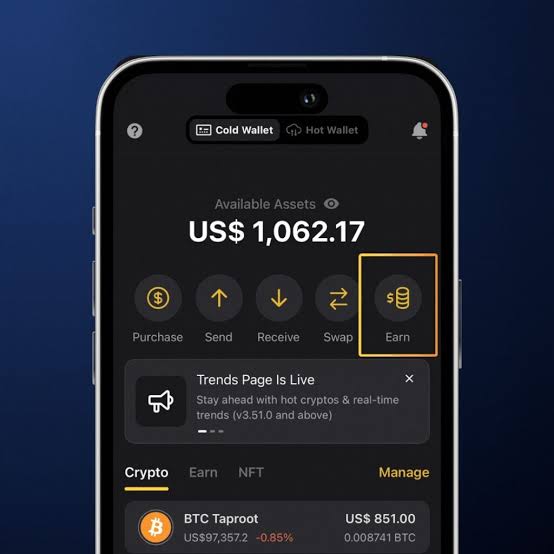
The app itself is free, weighs roughly 120 MB, and as of July 2026 sits around version 4.25.x, per the official coolwallet.io site. It serves both roles in the ecosystem: the companion app for CoolWallet Pro, Go and S hardware cards, and a standalone software wallet in its Hot Wallet mode. One download covers both — there is no separate "Pro app", and anything presenting itself as one is a red flag by definition.
No official APK. No desktop version. Here is what that means
Two facts about the CoolWallet app download surprise people, and both are deliberate decisions by CoolBitX rather than gaps.
There is no official APK sideload channel. Android users accustomed to grabbing APK files from aggregator sites will find no official CoolWallet APK anywhere. Every "CoolWallet APK" on a third-party download portal is either a repackaged copy of unknown provenance or active malware. Repackaged is the best case, and it is still terrible: you have no way to verify the binary was not modified, and a modified wallet app is a seed-harvesting machine. If your Android device cannot access Google Play, the honest answer is to use a different device, not a sideloaded wallet.
There is no desktop application and no browser extension. Not for Windows, not for macOS, not for Linux, not for Chrome. CoolWallet is a mobile-only ecosystem: the hardware cards talk to phones over encrypted Bluetooth (Pro and S) or NFC (Go), and the app is the entire interface. Any website offering a "CoolWallet desktop client" or a "CoolWallet Chrome extension" is distributing someone else's code with CoolBitX's logo on it — treat it as hostile. Desktop dApp users can bridge through WalletConnect from the mobile app, which works, though I will not pretend it is as smooth as a native extension; that trade-off is covered honestly on the disadvantages page.
⚠ Every "CoolWallet desktop download" and every third-party APK is a scam by definition, because no legitimate versions exist. This is not caution — it is arithmetic. The official channels number exactly two: Apple App Store and Google Play.
How to verify you have the genuine app
You have found a CoolWallet listing in the store. Before installing, run this thirty-second verification — it is the same checklist I use in audits:
- Check the developer name. The publisher must be CoolBitX. Not "CoolBitX Team", not "CoolWallet Official", not "CoolBitX Technologies Ltd" with an extra word bolted on. Impostor listings live and die on near-miss names.
- Check the version and history. The real app has been in the stores for years, sits around version 4.25.x as of July 2026, and shows a long update trail. A wallet app published three weeks ago with version 1.0 is not the real one, whatever its name says.
- Check the review count and age. Hundreds of thousands of users leave a footprint: thousands of ratings spread over years. Fakes carry a handful of five-star reviews written the same week.
- Cross-check from the official site. When in any doubt, open coolwallet.io in your browser and tap its store badges. This bypasses store search entirely and is the strongest single verification you can do.
System requirements, per the official coolwallet.io site (July 2026): iOS 15.6 or later, Android 7.0 or later, about 120 MB of storage. If your phone runs something older, do not hunt for an "old version APK" — older builds miss security fixes, and third-party archives of old builds inherit every risk described above. The section on aging phones below covers your real options.
Fake wallet apps: the red flags that catch people
Fake wallet apps are not a hypothetical — they surface in both stores every year across every major brand, live for days or weeks, and harvest seeds until they are reported. The pattern is consistent enough that you can learn it once and be safe for a career. Warning signs, in descending order of reliability:
- It asks for your seed phrase at first launch, before anything else. The genuine app's first-run flow offers to create a new wallet or pair a card; seed entry appears only when you explicitly choose to restore. An app leading with "enter your 12 words to continue" is a harvester, full stop.
- Developer name is almost right. One letter, one extra word, one hyphen. Almost is the tell.
- It arrived via a link — a DM, a QR code at an event, a search ad, a "support agent" in a chat group. The genuine path starts at coolwallet.io or a store search you initiated yourself, never at a link someone pushed to you.
- It promises what the real product does not have: a desktop version, an APK, "cloud backup of your seed", doubled staking rewards. Scammers oversell because accuracy does not convert.
- Urgency. "Migrate your wallet within 48 hours or lose access." Real self-custody has no deadlines; the blockchain does not expire your keys. Urgency is the con artist's oldest solvent for judgment.
Habit worth forming: never search app stores for wallet apps at all. Bookmark the official site once, and always enter through its badges. It costs five seconds and retires the entire impostor category.
App installed? Fund it the safe way
A wallet is only half the pipeline — you still need a reputable, regulated venue to convert money to crypto and back. Choose one with a long security record, then withdraw to self-custody.
Open a secure exchange accountFirst launch: what the genuine app asks, step by step
Install finished. Here is what a legitimate first run of the CoolWallet app looks like, so anything different rings an alarm.
- Welcome and basic permissions. The app introduces itself and, when relevant, requests Bluetooth permission — required on both platforms for the encrypted link to a Pro or S card — and NFC access for a Go. It does not need your contacts, your photos, or your location for core function; a wallet app demanding those deserves suspicion.
- The fork in the road. You choose between using a hardware card (Cold Wallet) or creating a software wallet on the phone (Hot Wallet). No email. No password. No account creation — there is nothing to create an account on. If you expected a sign-up form, the login and sign-up page explains why its absence is a security feature, not an omission.
- Hardware path: the app searches for your card over Bluetooth, pairs it, and walks you through generating a seed inside the secure element. The full ceremony — tamper check, backup, verification, test transaction — is documented in the CoolWallet Pro tutorial, and I strongly suggest following it rather than improvising.
- Software path: the app generates a seed stored on the phone and drills you on backing it up. Fine for small amounts; know the limits before relying on it.
- Set local protection. PIN and biometrics guard the app itself. These protect the phone-side interface — the hardware card has its own independent protections.
Nowhere in this flow does the genuine app ask you to type an existing seed phrase unless you specifically chose "restore wallet". Hold that line and the worst class of fakes cannot touch you.
After install: hot mode vs paired mode, one app, two personalities
A single CoolWallet app download gives you two very different wallets, switched by a toggle at the top of the interface, and understanding the difference is the difference between convenience and carelessness.
Paired (Cold Wallet) mode is the app acting as a window onto your hardware card. Balances and transaction history display on the phone, but every signature happens inside the card's CC EAL6+ secure element, and on the Pro you confirm the address and amount on the card's own e-paper display with a physical button press. Malware on the phone can lie to your eyes but cannot forge that on-card confirmation. This is the mode for savings.
Hot Wallet mode keeps a separate set of keys on the phone itself. It is faster for daily fiddling — dApp sessions via the Web3 browser with SmartScan, small swaps, experiments — and exactly as safe as your phone, which is to say: adequate for pocket change, wrong for savings. The two modes use different seeds and hold different funds; the hot wallet guide maps where the sensible line sits and how to graduate funds from hot to cold as amounts grow.
My standing recommendation: even if you bought a card, set up hot mode with a token amount and learn the app mechanics there. Mistakes in a sandbox cost pennies; the same mistakes in your savings wallet cost sleep.
Updating the app (and the card firmware) without drama
Wallet software is security software, and stale security software rots. Updates to the CoolWallet app arrive through the same two stores, which is another quiet advantage of the no-APK policy: the store's signature checks guarantee each update genuinely comes from CoolBitX, automatically, every time.
Sensible update practice, calibrated from years of watching things go wrong:
- Enable automatic app updates for the stores. The window between a fix shipping and your installing it is exposure for no benefit.
- Before major-version updates, confirm your seed backup is where you think it is. Not because updates wipe wallets — they do not — but because "phone broke during an update and my backup was a photo I deleted" is a support-forum genre. The backup, not the app, is the wallet.
- Card firmware updates for the Pro arrive through the app and require your explicit confirmation, with the card charged and nearby. They deliver new chains and security refinements; apply them at home over a few unhurried minutes, not at an airport gate. The tutorial covers the firmware flow in its maintenance section.
- Never install an update from outside the store — a link in email, a pop-up on a website, a "critical patch" pushed in a chat group. Real updates come from exactly one place per platform. Anything else is the fake-app playbook wearing an update costume.
Phone too old? Your real options, ranked
The requirements — iOS 15.6+ or Android 7.0+ — are modest by 2026 standards, but old phones exist, and what people do about them is where security goes to die. If your device cannot run the current app, here are your options, ranked by an auditor rather than a salesman:
- Best: use a newer phone. It does not need to be yours full-time or expensive. A recent mid-range Android used solely as a wallet terminal — no social apps, no sideloading, updated OS — is arguably more secure than a flagship crammed with two hundred apps. If crypto matters enough to hold a hardware wallet, it justifies a dedicated used handset.
- Acceptable: a family member's supported device for occasional use. Your keys stay in the card; the phone is just a window. Set a separate app PIN, and pair and unpair deliberately.
- Bad: hunting for an old APK that runs on your OS. This combines an unpatched operating system with an unverifiable binary — the two worst ingredients in mobile security, in one recipe, guarding your money.
- Worst: giving up and leaving everything on an exchange. The phone problem is solvable for the price of a used handset; custodial risk is a different category of problem entirely, as the cold wallet guide lays out.
One more incentive for the frugal: the hardware cards outlive phones by design. A Pro bought today, per the official coolwallet.io site (July 2026), pairs over standard Bluetooth and will follow you through your next several handsets. The phone is disposable infrastructure; the card and the seed are the durable parts. Budget accordingly — and check the discount page before paying list price for either card.
Frequently asked questions
Where do I download the official CoolWallet app?
Only from the Apple App Store or Google Play, published by developer CoolBitX. The safest route is to open the official coolwallet.io site and follow its store badges rather than searching the store directly. There are no other legitimate sources — no APK portals, no desktop downloads, no Telegram bots.
Is there an official CoolWallet APK for Android?
No. CoolBitX distributes the Android app exclusively through Google Play, and no official APK sideload channel exists. Any "CoolWallet APK" on a third-party site is unverifiable at best and malware at worst — a modified wallet app can silently harvest your seed phrase. If a device lacks Google Play, use a different device.
Is there a CoolWallet desktop app or Chrome extension?
No. CoolWallet is mobile-only: iOS 15.6+ and Android 7.0+, connecting to the cards via Bluetooth or NFC. No Windows, macOS or Linux application and no browser extension exist. Anything offering one is distributing fake software. Desktop dApp users can connect through WalletConnect from the mobile app instead.
How do I know the CoolWallet app I found is genuine?
Check that the developer is exactly CoolBitX, the version is around 4.25.x (as of July 2026) with a years-long update history, and the listing has thousands of ratings accumulated over time. Best practice: navigate from coolwallet.io directly to the store listing, which bypasses fake search results entirely.
What are the system requirements for the CoolWallet app?
According to the official coolwallet.io site (July 2026): iOS 15.6 or later, Android 7.0 or later, and roughly 120 MB of storage. Bluetooth is required for pairing a CoolWallet Pro or S, and NFC for the CoolWallet Go. The app is free; it earns nothing unless you use optional third-party services.
Does the CoolWallet app work without the hardware card?
Yes. The app includes a standalone Hot Wallet mode that keeps software keys on your phone — usable without owning any CoolWallet card. It is convenient for small amounts and dApp testing, but it offers phone-level security, not secure-element security. For meaningful holdings, pair it with a Pro or Go card.