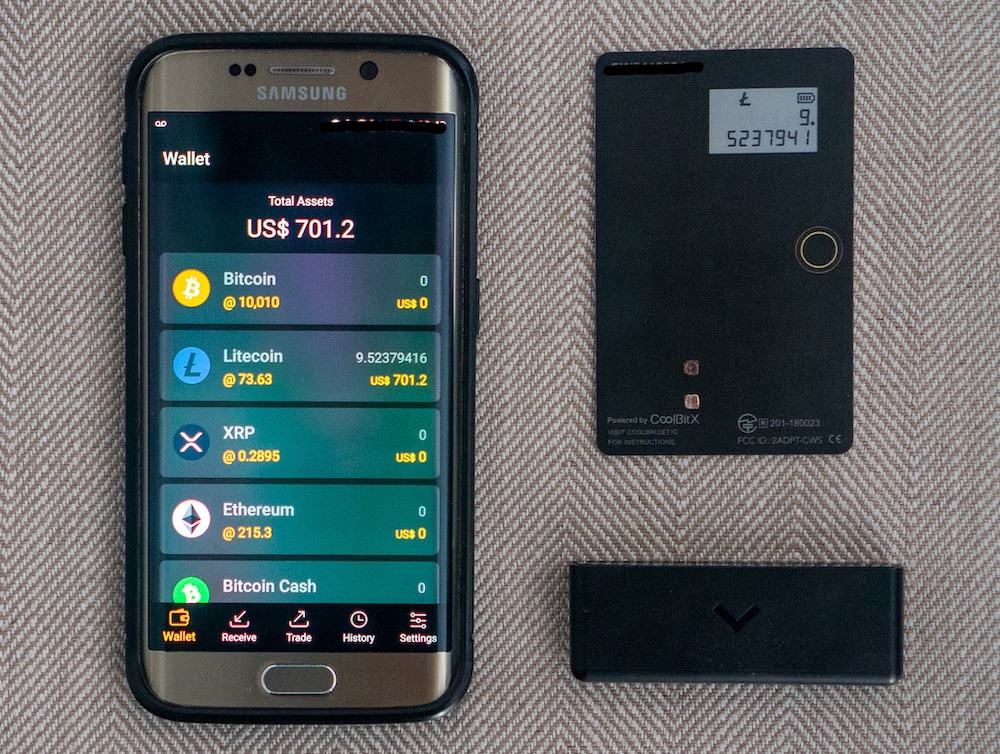
Cold storage explained on your fingers
Strip away the jargon and cold storage is one idea: your private keys live on a device that is not connected to the internet. That is the whole definition. A hot wallet keeps keys on an internet-connected device — your phone, your laptop, a browser extension. An exchange account is not a wallet at all; it is an IOU from a company that holds keys on your behalf. Cold means offline keys. Everything else is detail.
Why does offline matter so much? Because the internet is how attackers reach you. Malware on your laptop can read files, log keystrokes, and swap addresses in your clipboard. A phishing site can trick your browser wallet into signing something hostile. But none of that code can touch a chip that has no network connection. To steal keys from proper cold storage, an attacker needs your physical device plus your PIN, or your seed phrase. That shrinks the attack surface from "everyone on the internet" to "people who can reach into your desk drawer" — a categorical improvement, not an incremental one.
Here is the part marketing skips: the CoolWallet cold wallet is not cold because of the card shape, the app, or the brand. It is cold because of where the keys are born and where they stay. When you set up a CoolWallet Pro, the seed is generated inside the secure element on the card, using the chip's own hardware randomness. The keys derived from it never leave that chip. Your phone never sees them. The Bluetooth link never carries them. CoolBitX never has them. If you understand that one sentence, you understand cold storage better than most people holding crypto today.
How the CC EAL6+ secure element works, in plain words
CC EAL6+ is not a marketing sticker — it is a Common Criteria evaluation level, an international standard used to grade security hardware, and level 6+ means the chip design was "semiformally verified and tested" against sophisticated, well-funded attackers. Passports, bank cards and SIM cards use secure elements; the CoolWallet Pro uses one certified a notch above most of them. For comparison, the older CoolWallet S carries a CC EAL5+ chip — still respectable, one formal level lower.
Think of the secure element as a tiny, paranoid civil servant in a sealed booth. You can pass documents through a slot; you can never enter the booth. When your app wants to send bitcoin, it passes the unsigned transaction through the slot. The civil servant checks that you pressed the physical button on the card and that the details on the e-paper display match what you approved, signs the paper inside the booth, and passes back only the signature. The stamp — your private key — never comes through the slot in either direction. Even if your phone is riddled with malware, the malware is stuck outside the booth shouting requests, and the on-card display lets you catch it lying.
The booth also defends itself physically. Secure elements are built to resist probing, voltage glitching, and side-channel snooping, and the CoolWallet's laminated, tamper-evident card body means nobody can open the device without visibly destroying it. Per the official coolwallet.io site (July 2026), there have been zero confirmed remote hacks of the secure element to date. I treat that claim as what it is — a vendor statement — but it is consistent with the public record, and a decade is a long time in this industry.
Cold vs hot vs exchange custody: the honest table
People agonize over which hardware wallet to buy while keeping ninety percent of their funds on an exchange. That is optimizing the lock on the shed while the house stands open. Here is the actual hierarchy of custody:
| Model | Who holds the keys | Main risk | Recovery if things go wrong | Sensible use |
|---|---|---|---|---|
| Cold wallet (CoolWallet Pro/Go) | You, offline in a secure element | Losing the seed phrase; signing a bad transaction yourself | Seed phrase restores everything on a new device | Savings, long-term holdings |
| Hot wallet (app, extension) | You, on an internet-connected device | Malware, phishing, phone theft | Seed phrase — if the malware did not get it first | Spending money, dApp experiments |
| Exchange account | The exchange | Hacks, freezes, bankruptcy, account lockouts | Whatever their support and jurisdiction allow | Trading, on/off-ramp — then withdraw |
Notice the recovery column. It is the most underrated line in the table. With a cold wallet, disaster recovery is entirely in your hands: card destroyed, phone stolen, house flooded — the 12, 18 or 24 words bring everything back on fresh hardware. With an exchange, recovery is a support ticket and a prayer. The login page walks through the full lost-phone, lost-card, lost-seed rescue matrix; the summary is that only one loss is fatal, and it is not the hardware.
Cold for savings, hot for pocket change
The split-custody habit — hardware for what matters, a reputable exchange only for trading and cashing out — has outlived every bull and bear market I have audited through. Set up the exchange side properly too.
Open a secure exchange accountCard vs USB stick vs NFC: how CoolWallet differs from Ledger, Trezor and Tangem
Hardware wallets have settled into three body types, and each one encodes a philosophy. The USB stick — Ledger Nano X, Trezor Model T and Safe 5 — plugs into a computer, carries a comparatively large screen, and assumes you administer your crypto at a desk. The NFC card — Tangem, and CoolWallet Go — has no battery or screen at all and signs with a tap against your phone. The CoolWallet Pro sits deliberately between the camps: card-shaped like Tangem, but with its own e-paper display, physical button and encrypted Bluetooth link like a shrunken Ledger.
The Pro's pitch is that it keeps the one feature auditors refuse to give up — on-device verification — in a format you will actually carry. The e-paper strip shows the receiving address and amount straight from the secure element. Malware on your phone can repaint the app's screen; it cannot repaint the card's. Screen-less NFC cards like Tangem and the Go protect your keys just as staunchly, but you end up trusting the phone's display for what you are signing, which quietly reintroduces the very device you were trying not to trust.
The USB camp counters with bigger screens showing full transaction detail, desktop suites, and — in Trezor's case — fully open-source firmware. All fair. The cost is bulk and habit: the device lives in a drawer, and coins pile up on exchanges between visits. My field observation after years of watching real users: the best hardware wallet is the one that is with you when you need to receive, verify or move funds. A card in your wallet wins by showing up. The trade-offs cut the other way too, and I document every one of them on the disadvantages page.
The threat model: what a cold wallet protects you from — and what it cannot
Security without a threat model is theater. So let us be precise about what the CoolWallet cold wallet actually defends against.
What it protects you from
- Malware on your phone or computer. Keys are not there to steal, and the on-card display defeats address-swapping tricks — verify on e-paper, always.
- Exchange failures. Hacks, withdrawal freezes, bankruptcies: irrelevant to coins you custody yourself.
- Remote attackers en masse. Nobody in another country can touch a key that never goes online.
- Casual physical theft. A stolen card without your PIN is a fancy piece of plastic; a thief cannot extract keys from the secure element.
What it cannot protect you from
- Yourself signing a malicious transaction. If a scam dApp asks for a token approval and you confirm it on the card, the chip did its job — you approved a robbery. Read what the e-paper shows.
- Seed phrase exposure. Type your 12, 18 or 24 words into any website or app, and every layer of hardware becomes decoration. This is the number one loss vector I see, every single year.
- Coercion. The infamous wrench attack. Hardware cannot fix "someone forces you to unlock it".
- Losing the seed with no backup. No seed, no recovery, no exceptions — CoolBitX cannot help, by design.
⚠ No legitimate party will ever ask for your seed phrase. Not CoolBitX support, not this site, not a wallet app "validating" your backup, not an airdrop claim page. Every such request, without exception in the history of the industry, is theft. Close the tab.
Seed phrase discipline: the boring habits that do the real work
The seed phrase is where cold storage lives or dies, so it deserves its own drill. When you initialize a CoolWallet Pro, the app walks you through generating a seed of 12, 18 or 24 words, created inside the secure element. The box ships with two paper recovery cards for exactly this purpose — use both.
The rules I give every client, unchanged since 2017:
- Write it by hand, on paper or metal. No photos, no cloud notes, no password managers, no email drafts. Anything that touches an internet-connected device is no longer a cold backup.
- Make two copies in two locations. Fire, flood and burglary are single-location events. Home safe plus a trusted second site — bank deposit box, or family — covers the common disasters.
- Verify the backup before funding the wallet. The Pro tutorial includes a verification step; do not skip it. A miscopied word discovered two years later is a tragedy with no author but you.
- Never digitize it, even once, even briefly. The clever hybrid schemes people invent — encrypted screenshots, split notes in three email accounts — are how clever people lose coins.
- Tell one trusted person how to find it (not what it says). Estate planning for self-custody is a real thing; unrecoverable coins after an accident help nobody.
A useful mental test: if your house burned down tonight while your phone died in the fire, could you recover every coin tomorrow from what survives elsewhere? If the answer is yes, your discipline is adequate. If you hesitated, fix it this week.
When cold storage is overkill (an auditor says the quiet part)
Hardware wallet vendors will never tell you this, but I am not a vendor: not everyone needs a cold wallet. Security spending should be proportional to what it protects. If your entire crypto position is US$150 of experiments, spending ~US$149 (the international price of a CoolWallet Pro, per the official site, July 2026) to protect it fails basic arithmetic. A carefully used hot wallet — like the CoolWallet app's hot mode — with a properly backed-up seed is a reasonable tool at that scale.
My rule of thumb, worth what every rule of thumb costs: once losing your holdings would genuinely hurt — a month's salary is a common threshold — the hardware pays for itself in avoided risk and, honestly, in sleep. Below that, prioritize the free wins first: unique passwords, an authenticator app for your exchange, seed backups on paper, and the habit of never clicking wallet links in DMs.
There is also a middle path that gets ignored: the CoolWallet Go at NT$2,167 (roughly US$69–79 internationally) delivers a genuine secure element in the cheapest form CoolBitX makes. It lacks the Pro's on-card screen — read the trade-off honestly on the home page overview — but it turns "hardware wallets are expensive" into a weaker excuse. And if you eventually outgrow it, it becomes a perfectly good backup device or a starter card for someone you are onboarding into self-custody.
Moving from exchange to cold: the graduation checklist
If this page convinced you, here is the exact sequence I use when moving someone from exchange custody to a CoolWallet cold wallet. Slow is smooth; smooth is fast.
- Buy the device from the official store only — coolwallet.io — never second-hand, never from a marketplace reseller with a too-good price. Tampered devices are a real scam category; the discount page explains why a 95 percent off deal is always a trap.
- Check the tamper-evident packaging before first use, then follow the full setup tutorial: pair, generate the seed on-device, back it up twice, verify the backup.
- Send a small test amount from your exchange first. Confirm it arrives, confirm you can see it, and — this is the step everyone skips — send a small amount back out, verifying the address on the e-paper display. You have now rehearsed both directions before the stakes are real.
- Move the balance in a second, larger transaction. Network fees on two transfers are the cheapest insurance you will ever buy.
- Leave on the exchange only what you actively trade. The safe is for savings; the bank is for transactions. That division of labor is the entire philosophy of this site in one line.
Total elapsed time, done carefully: under an hour. Against that, weigh every exchange collapse you have read about since 2022. The math has never been hard — people just postpone it. Do not be the case study in someone else's audit.
Frequently asked questions
Is CoolWallet a true cold wallet?
Yes. Private keys are generated and stored inside a CC EAL6+ certified secure element on the card (CC EAL5+ on the older S model) and never leave the chip. The phone app only sends unsigned transactions in and receives signatures back, so the keys stay offline even though the app is online.
Does Bluetooth make the CoolWallet Pro less cold?
Not meaningfully. The Bluetooth link is end-to-end encrypted and carries only transaction data and signatures — never keys. Signing happens inside the secure element, and you confirm details on the card’s e-paper display with a physical button. Purists who want zero wireless can prefer air-gapped devices, but no key material ever transits the radio.
What happens if my CoolWallet card breaks or is stolen?
Your funds are safe as long as you have your seed phrase. A thief cannot extract keys from the secure element or use the card without your PIN. You simply buy a new device — or use any compatible wallet — and restore from your 12, 18 or 24 words. The seed, not the card, is the wallet.
How is CoolWallet different from Ledger or Trezor?
Form factor and workflow. Ledger and Trezor are USB devices built around desktop use with larger screens; CoolWallet Pro is a credit-card-sized, Bluetooth-connected card with an e-paper display, built for mobile-first use and daily carry. Trezor offers open-source firmware, which CoolWallet does not; CoolWallet offers a format you keep in a physical wallet.
Can I store Bitcoin, Ethereum and Solana on one CoolWallet?
Yes. According to the official coolwallet.io site (July 2026), the Pro supports 30+ blockchains and 12,000+ tokens, including BTC, ETH, SOL, ADA, XRP, DOGE, TON, ATOM and USDT/USDC plus EVM chains such as Polygon, Arbitrum and Optimism. One seed phrase backs up all of them together.
Is a cold wallet worth it for small amounts?
Often not, and vendors will not say so. If your holdings are worth less than the device, a carefully used hot wallet with a paper seed backup is defensible. Once losing your crypto would genuinely hurt — say a month’s salary — hardware cold storage becomes cheap insurance rather than an expensive gadget.